Quix is an Alfred workflow that makes quick analysis of websites for SEO, page speed, security, and other checks a lot easier. It prevents you from copy-pasting URLs into different tools, instead opening them with a few keystrokes.
Demo
After you install this workflow, the following magic happens when you hit Alt-Q ( ⎇-Q ) or type quix in Alfred:
Once you select one of the actions, it’ll take the foremost URL of your browser and perform it. This way you can run a speed test, a schema test, and some social snippet tests in a few seconds, without copying and pasting URLs all the time or using 5 different bookmarklets.
Requirements
For this to work you need a Mac, with AlfredApp (version 5), and since it is a workflow, you’ll need their paid Powerpack too.
Quix currently works with Safari, Safari Technology Preview, Chrome, Chrome Canary, Firefox (including its development edition), Brave Browser (including its beta), and Vivaldi.
Frequently asked questions
The Twitter command or SEOCSS command isn’t working, what’s wrong?
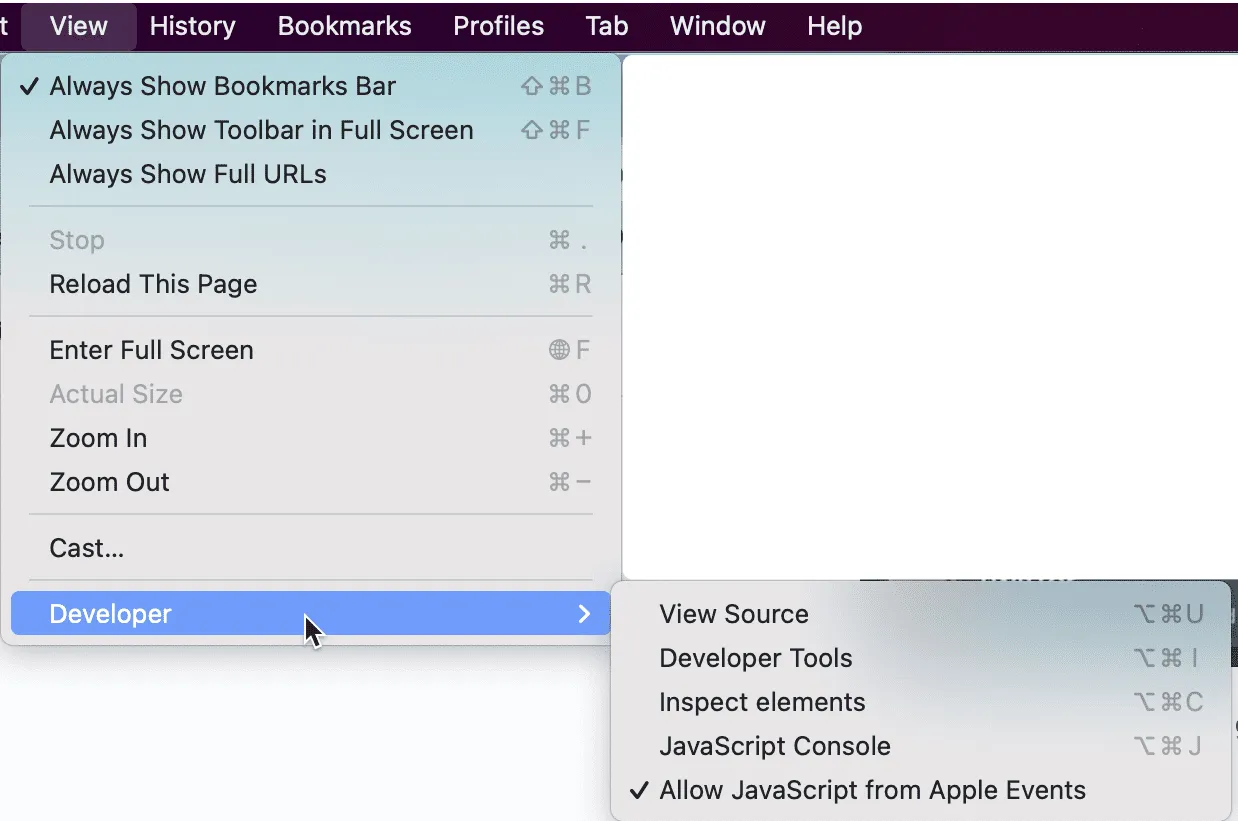
You have to enable “JavaScript from Apple Events” for this to work. In most browsers this is under View → Developer → Allow JavaScript from Apple events.
How do I get updates for Quix?
The workflow will auto-update to the latest version!
Do you support Firefox?
As of version 3.0: yes we do!
Could you support <insert browser here>?
If your browser doesn’t already work and you’d like to have support for it, please open an issue on GitHub!
Download
You only have to download Quix once, after that it should auto-update from Quix’s GitHub automatically.
Download Quix AlfredApp workflow
Changelog
4.1
- Added an “Is it agent ready?” command that opens isitagentready.com for the current browser URL.
4.0.1
- Switched auto-updater to use GitHub releases.
4.0
- Added speed checks via GTmetrix and WebPageTest.
- Added W3C HTML validator, SSL certificate check (SSL Labs), and DNS check (MXToolbox).
- Added Robots.txt, security headers, and Bing cache commands.
- Added unified social preview via metatags.io; renamed old “Social” command to “Clear social cache”.
- Updated Twitter card validator to cards-dev.x.com.
- Removed broken Google cache command; replaced with Bing cache.
- Removed deprecated Mobile Friendly Test.
- Updated PageSpeed Insights URL to pagespeed.web.dev.
3.1.2
- Fix for site search commands when your search term is more than one word.
3.1.1
- Minor fix for archive.org site command.
3.1
- Added support for Archive.org with two new commands (page and whole-site lookups), plus a command to save the current page to Archive.org.
3.0
- Major browser support improvements: added support for Firefox, Firefox Developer Edition, Chrome Canary, Safari Technology Preview, Brave Beta, and Vivaldi.
- Added a user config option to select a default browser, for cases when you open Quix from outside a browser.
- Added an “is this site down for everyone” command.
- Added a “who hosts this site” command.
- Re-built much of the workflow to work more intuitively.
2.1
- Added support for Brave Browser.
2.0.1
- Some fixes as AlfredApp updated how the automation tasks work slightly.
2.0
- Made Alfred Quix compatible with AlfredApp V5 workflow builder.
- Added OneUpdater so the workflow can be updated easily.
1.0
- Initial version.